Can You See Who Views Your Instagram Profile?
No — Instagram does not show you who views your profile. Despite years of rumors and viral TikTok "hacks," there is no official feature that reveals individual instagram profile views by name. What Instagram *has* started testing is an aggregate view count — a number showing how many times your profile was visited, with zero identifying information about who viewed your instagram profile.
The distinction matters. An aggregate count tells you "47 people visited your profile this week." It does not tell you that your ex checked your page at 2 AM. These are fundamentally different features, and Instagram has only committed to the first one.
So why does this question refuse to die? Because the demand is enormous. TikTok videos promising to reveal "how to see who viewed your profile" have racked up over 100K views each. The search query itself pulls tens of thousands of monthly searches. People want to know if their crush is lurking, if an ex is still watching, or if a potential employer checked them out before an interview.
As one X user put it: "Wouldn't even care if Instagram reported profile views. Yes I viewed your profile 17x today. I love you, now what?"
That impulse is universal — but the technology Instagram offers does not satisfy it. What you *can* do is track who views your Stories, monitor aggregate analytics through a Business account, and watch for the new profile view count feature rolling out in 2026. You can also review how Instagram privacy notifications work so you understand exactly what the platform does and doesn't reveal.
The confusion is understandable. Other platforms handle this differently — TikTok lets you see who visited your profile (if you opt in), and LinkedIn has offered profile viewer data for over a decade. Instagram choosing not to reveal this information is a deliberate product decision, not a technical limitation.
This guide breaks down every feature Instagram actually provides, explains what the new 2026 update changes, and warns you about the scams designed to exploit your curiosity. Whether you are a casual user wondering about a specific visitor or a creator trying to understand your audience, you will find the answer here.
*Last updated: March 2026*
Instagram's New Profile Views Count Feature (2026 Update)
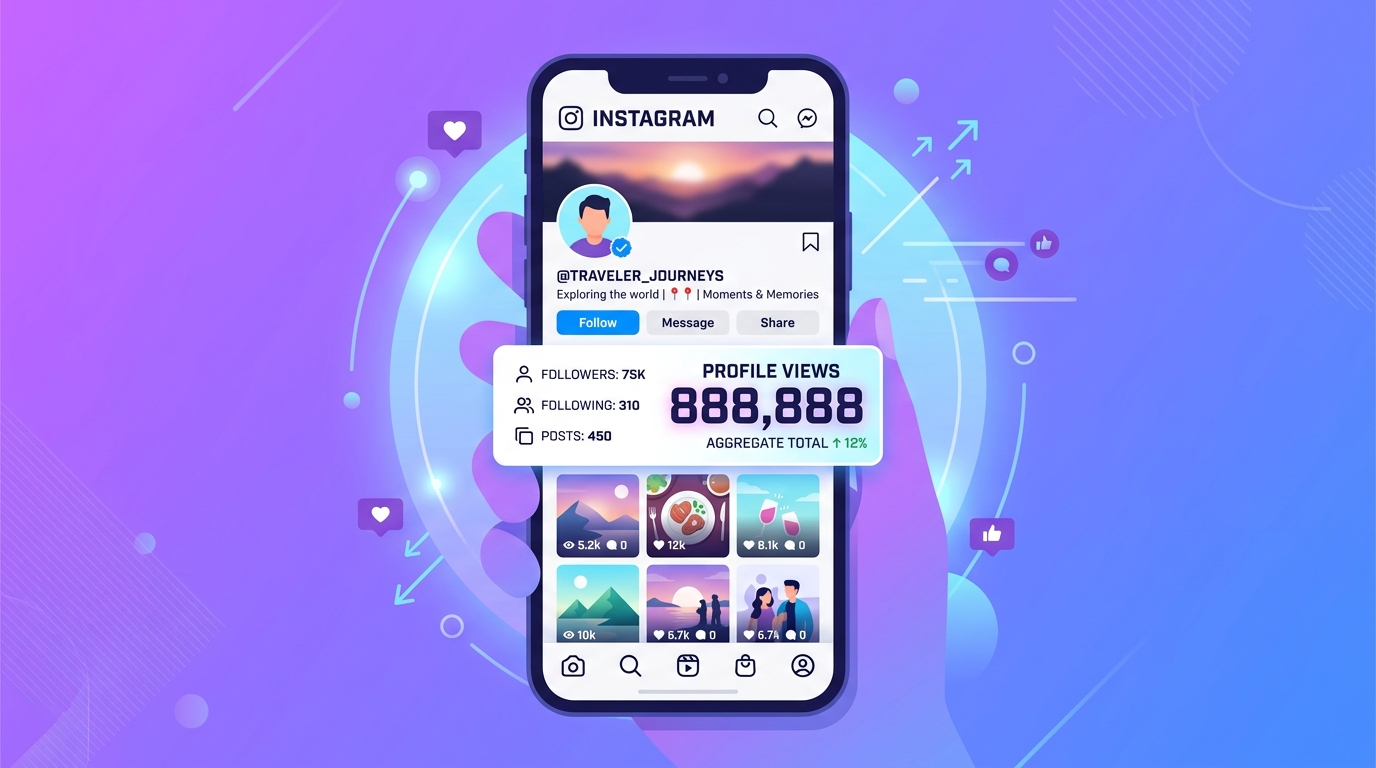
Instagram is testing a feature that displays how many times your profile was viewed over the past 14 days — but it still does not reveal who those viewers are. This is a visibility metric, not a stalker tracker.
What Meta Is Testing
The new profile views counter appears directly on your profile page, showing a rolling 14-day total of visits. Meta first began testing this feature in select markets in late 2025, and the rollout has expanded throughout early 2026. According to Meta Accounts Center documentation, the feature tracks profile visits over a 14-day rolling window and updates the count in near real-time.
The counter is available to all account types — Personal, Creator, and Business. This is notable because detailed analytics were previously locked behind professional accounts.
What It Shows vs. What It Doesn't
The feature shows exactly one data point: the total number of profile visits in the last two weeks. It does not show:
- Individual viewer names or usernames
- When specific visits happened
- Whether someone visited once or ten times
- Whether the visitor follows you or not
Think of it like a website hit counter from the early 2000s — a number, nothing more.
This means that even with the new feature fully enabled, you cannot determine if a specific person — your ex, a potential employer, a competitor — visited your profile. The data is completely anonymized and aggregated.
Who Has Access and How to Check
The rollout is gradual and server-side. There is no setting to force-enable it. If the feature is available on your account, you will see a view count beneath your bio or in your profile dashboard. If you don't see it, you are not yet in the test group.
Instagram also provides a privacy toggle that lets you hide your profile view count from others. When enabled, other users cannot see how many people visited your profile — and in return, you lose the ability to see your own count. We've found that most users prefer keeping the counter visible, since the trade-off removes your own analytics access.
How the Count Is Calculated
Each unique account visit within the 14-day window counts as one view. If the same person visits your profile five times in a week, it is unclear whether Instagram counts that as one view or five — Meta has not published the exact methodology. What we do know is that the count resets on a rolling basis, so the number reflects your most recent two weeks of activity rather than a lifetime total.
The feature also does not distinguish between followers and non-followers, or between people who found your profile through search versus those who tapped your username on a post. It is a single, undifferentiated number.
What Instagram Actually Shows About Your Viewers
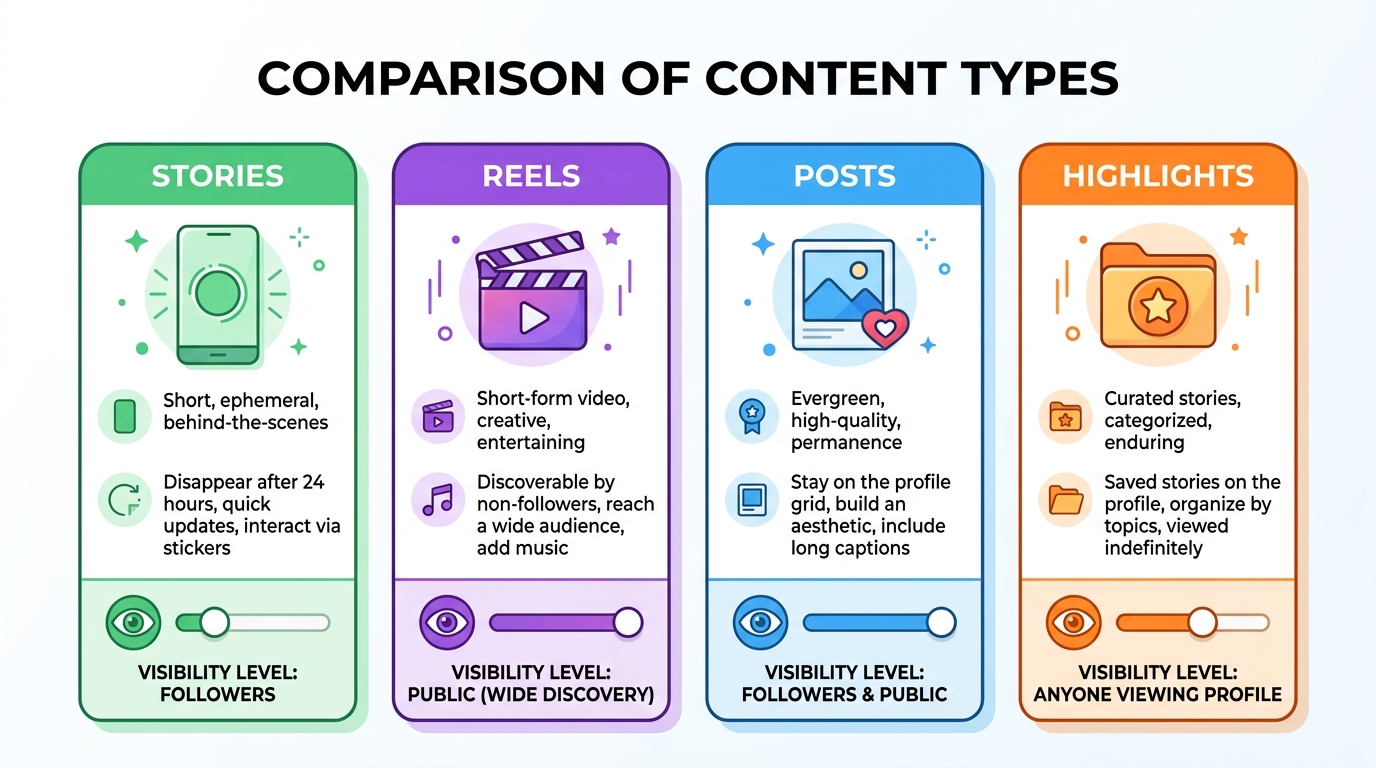
Instagram reveals viewer identity for Stories only — everything else shows counts at best and nothing at worst. Here is the full breakdown by content type.
Stories
Stories are the only content format where Instagram shows exactly who viewed it. You get a complete list of usernames, accessible by swiping up on your Story. This list remains available for the full 48-hour lifespan of the Story. After it expires, the viewer data disappears unless you saved it to your Highlights beforehand.
The viewer list is ordered by Instagram's algorithm — not chronologically. Accounts you interact with most frequently tend to appear near the top. This means the order does not indicate who viewed your Story first or most recently.
You can also control who sees your Stories using the Close Friends list or by hiding your Story from specific accounts.
Reels
Reels display a view count but do not reveal individual viewers. You can see how many people watched your Reel, but not a single username. This applies to both your own Reels and Reels posted by others — the count is public, the viewer list is nonexistent.
A Reel "view" is counted when someone watches the video for at least 3 seconds or interacts with it (like, comment, share). Repeated views from the same account can increment the counter, which is why view counts sometimes exceed your follower count significantly.
Posts (Photos and Videos)
For photo posts, Instagram shows no view-related data at all. You see likes, comments, and shares — but no view count and no viewer list. For video posts, Instagram displays a view count (plays), but again, no individual viewer information.
Highlights
Highlights inherit the viewer data from the original Story. If you view the Highlights viewer list within 48 hours of the original Story posting, you can still see who watched it. After that window closes, the viewer list is gone — even though the Highlight itself remains on your profile indefinitely.
Live Videos
When you go live on Instagram, you can see viewer usernames in real time as they join. However, once the broadcast ends, the viewer list is no longer accessible. You retain only the total viewer count and any comments made during the session.
Notes
Instagram Notes offer zero viewer tracking. You cannot see who read your Note, how many people saw it, or whether anyone interacted with it beyond direct replies.
Comparison Table
| Content Type | Shows Individual Viewers | Shows View Count | Time Limit |
|---|---|---|---|
| Stories | Yes | Yes | 48 hours |
| Reels | No | Yes | None |
| Photo Posts | No | No | N/A |
| Video Posts | No | Yes | None |
| Highlights | Inherited from Story | Yes | 48 hours from original |
| Live Videos | Yes (during broadcast) | Yes | During live only |
| Notes | No | No | N/A |
If you want to limit what others can discover about your activity, you can hide activity on Instagram through several built-in privacy controls.
Instagram Insights: Profile Analytics for Business Accounts
Business and Creator accounts get a Profile Visits metric inside Instagram Insights — the closest thing to profile view tracking that Instagram officially supports. This metric has existed for years and remains the most reliable way to monitor interest in your profile.
What the Profile Visits Metric Shows
The Profile Visits number in Insights tells you how many unique accounts visited your profile during a selected time period (7, 14, or 30 days). It also shows the percentage change compared to the previous period, so you can spot trends. You can check profile views in Insights by tapping the Insights button on your profile or navigating through the Professional Dashboard.
Like the new aggregate counter, this metric does not show individual viewer names. It is strictly a count.
Business vs. Personal Account Analytics
The gap between account types is significant:
- Personal accounts see almost nothing — just the new aggregate profile view count (if enabled in your region) and Story viewer lists
- Business/Creator accounts get Profile Visits, Accounts Reached, Accounts Engaged, content performance breakdowns, audience demographics, and peak activity times
If understanding your profile traffic matters to you, the upgrade is worth it. You can switch to a business account in under two minutes through Settings, and the process is fully reversible.
How to Interpret Profile Visit Data
A spike in profile visits usually correlates with one of three things: a Reel going viral, a mention by another account, or a particularly engaging Story. In our experience, tracking which content drives profile visits — rather than just likes — gives a much clearer picture of what actually converts casual viewers into followers.
Watch for the ratio between profile visits and new followers. If visits are high but follower growth is flat, your bio or content grid likely needs optimization. If visits are low but you are gaining followers, your content is doing the work without requiring a profile visit — a sign of strong Reels or Explore performance.
Limitations of Instagram Insights
Instagram Insights is powerful but imperfect. The data is delayed by up to 48 hours in some cases, and the profile visits metric only tracks logged-in users — anyone browsing without an account or while logged out is invisible. The dashboard also cannot tell you *where* visitors came from (search, direct link, another profile), which limits your ability to attribute traffic to specific campaigns or content.
For more granular data, some creators supplement Insights with link-tracking tools like UTM parameters on their bio link, which can reveal how many profile visitors actually click through to external pages.
Why Third-Party "Profile Viewer" Apps Are Scams
Every app or website that claims to show you who viewed your Instagram profile is a scam — no exceptions. Instagram's Graph API documentation explicitly excludes profile viewer data from all available endpoints. If the data doesn't exist in the API, no third-party app can access it.

Why These Apps Cannot Work
Instagram does not record or expose individual profile viewer information to any external service. The platform's API provides access to content metrics, comments, and basic account data for authorized business integrations. Profile viewer identity is simply not a data point that exists in any accessible form.
This is not a limitation that clever developers can work around. It is an architectural decision by Meta. No app — free or paid — has a secret backdoor to this data.
Common Scam Patterns
These fraudulent apps typically follow one of three playbooks:
- Data harvesting: The app requests your Instagram login credentials, then uses your account to follow spam accounts, like promotional posts, or scrape your DMs and contact list
- Phishing pages: A website mimics the Instagram login screen, captures your username and password, then shows fabricated "viewer" results while your credentials are sold
- Malware delivery: The app installs tracking software on your device, monitors your activity, or injects ads into your browser
The "viewer lists" these apps display are completely fabricated — typically pulling random accounts from your followers list or generating fake usernames to appear legitimate.
Never enter your Instagram password into any third-party app or website claiming to show profile viewers. These services exist solely to steal your credentials, harvest your data, or install malware on your device.
What to Do If You Already Used One
If you have already entered your credentials into a profile viewer app, take these steps immediately:
- Change your Instagram password — use a unique, strong password you haven't used elsewhere
- Enable two-factor authentication (Settings → Security → Two-Factor Authentication)
- Revoke third-party app access (Settings → Security → Apps and Websites → remove suspicious apps)
- Check your account activity for unfamiliar logins (Settings → Security → Login Activity)
- Scan your device for malware if you downloaded an app
Acting fast limits the damage. Most credential theft is automated, so changing your password within hours can prevent unauthorized access.
How to Spot a Scam App Before Installing
Before downloading any Instagram-related app, check for these red flags:
- The app asks for your Instagram password (legitimate apps use OAuth and never need your password directly)
- Reviews mention "it showed my viewers" — these are typically fake or paid reviews
- The app requires excessive permissions unrelated to its stated purpose
- The developer has no website, no other apps, and no verifiable identity
- The app is not listed in Instagram's official partner directory
If an app promises something Instagram's own interface cannot do, it is almost certainly fraudulent. Stick to Instagram's built-in analytics and the official Meta Business Suite for your data needs.
How to Increase Your Instagram Profile Views
The most effective way to get more profile views is to create content that makes people curious about who you are. Every Reel, Story, or comment you post is a potential doorway to your profile — your job is to make people want to walk through it.
In our experience helping creators grow their accounts, these strategies consistently drive the most profile visits:
Optimize Your Bio for First Impressions
Your bio is the landing page of your Instagram presence. It should communicate what you do, who you help, and why someone should follow you — all within 150 characters. Include a clear call-to-action and a relevant link. Profiles with a specific value proposition see significantly more follow-through from visitors.
Post Reels Consistently
Reels remain the highest-reach format on Instagram in 2026. A single Reel that hits the Explore page can drive thousands of profile visits in 24 hours. Understanding the Instagram algorithm in 2026 helps you create content the platform actively promotes.
Time Your Posts Strategically
Posting when your audience is most active increases initial engagement, which triggers algorithmic distribution, which leads to more profile visits. Check your Insights data for peak hours, or reference data on the best time to post on Instagram as a starting point.
Engage in Comments and DMs
Leaving thoughtful comments on larger accounts in your niche puts your username in front of their audience. When your comment is insightful or funny, people tap your profile to learn more. This is one of the most underrated organic growth tactics available.
The key is quality over quantity. One genuinely helpful or entertaining comment on a viral post can drive more profile visits than 50 generic "great post!" replies. Prioritize accounts in your niche with 10K-100K followers — large enough to have an active comment section, small enough that your comment won't get buried.
Collaborate with Other Creators
Instagram's Collab feature lets you co-author posts and Reels that appear on both profiles simultaneously. When you collaborate with someone in a complementary niche, their entire audience sees your name and can tap through to your profile. Even a single well-matched collaboration can result in hundreds of new profile visitors.
Use Hashtags and SEO Keywords
Instagram's search now functions more like a search engine. Include relevant keywords in your captions, alt text, and bio. Hashtags still help with discoverability, though their impact has shifted — a mix of 5-10 targeted hashtags outperforms the old strategy of using 30.
For a deeper breakdown of growth strategies, see our guide on how to get more Instagram followers.
Looking to accelerate your growth? Our Instagram growth services help you build real momentum with authentic engagement — so more people discover your profile organically.
Instagram Profile Views vs. Other Platforms
Instagram is not the only platform where users want to know who is checking their profile — but each network handles this question very differently. Here is how the major platforms compare.
| Platform | Shows Individual Viewers | Shows View Count | Privacy Controls | Viewer Data Scope |
|---|---|---|---|---|
| No | Yes (new, 14-day) | Can hide count | Stories only (48h) | |
| TikTok | Yes (Profile View History) | Yes | Can disable | Must opt in to see/be seen |
| Yes (partial) | Yes | Can go anonymous | Last 90 days, limited in free tier | |
| No | No | N/A | No viewer data at all |
TikTok: Full Opt-In Viewer History
TikTok launched its Profile View History feature in 2022, allowing users to see exactly who visited their profile over the past 30 days. The catch: it is mutual. You must enable the feature to see your viewers, and enabling it means your visits to other profiles become visible too. This reciprocal model balances curiosity with fairness.
LinkedIn: The Professional Standard
LinkedIn has shown profile viewers for years, making it the gold standard for this feature. Free accounts see a limited list of recent viewers, while Premium members get the full 90-day history with detailed analytics. LinkedIn reports that profile views increase by 40% after users optimize their headline — proving that the visibility of this metric directly motivates profile improvement.
Facebook: No Viewer Data
Despite being owned by the same parent company as Instagram, Facebook offers zero profile viewer information. No count, no list, no analytics. Facebook has explicitly stated it does not track or share this data. This is consistent across personal profiles, Pages, and Groups — none offer individual viewer tracking.
Snapchat: Score but No Viewers
Snapchat shows a "Snap Score" that reflects overall activity, but it does not reveal who views your profile. Like Instagram Stories, Snapchat does show who opened your Snaps — but profile visits remain completely private.
Why Instagram Takes a Different Approach
Instagram's decision to show aggregate counts without individual identities reflects a deliberate privacy philosophy. The platform was built around visual sharing with a younger, more privacy-conscious audience than LinkedIn's professional user base. Revealing individual viewers could fundamentally change how people use the app — creating anxiety around casual browsing and discouraging exploration.
The aggregate count feature is a compromise: it gives users *some* signal about their profile's reach without turning Instagram into a surveillance tool.
The Bottom Line
Instagram does not show who views your profile, and no third-party app can change that. The new 2026 aggregate profile view count feature is a step toward more transparency, but it reveals a number — not names.
Your best tools for understanding profile traffic are Instagram Insights (available on Business and Creator accounts) and the new profile view counter as it rolls out. Together, these give you a solid read on how much attention your profile attracts over time.
Rather than searching for ways to unmask anonymous visitors, focus on what you can control: creating content that drives profile visits, optimizing your bio for conversions, and posting consistently at peak engagement times. The creators who succeed on Instagram are the ones who spend their energy making people *want* to visit their profile — not figuring out who already did.
If privacy is a concern on the other side of the equation, remember that Instagram is one of the safer platforms for anonymous browsing. View a profile, scroll through posts, check someone's Reels — none of that is tracked or shared with the account owner. The only content type that records your visit is Stories, and only for 48 hours.
And whatever you do, skip the third-party apps. Every single one that promises to show profile viewers is a scam — no exceptions. Your time and security are better spent building a profile that people actively want to visit.